 Skip to content

What is an IPTV Playlist?
An IPTV playlist is a crucial component of Internet Protocol Television (IPTV) that allows users to access a variety of live and on-demand television channels through their internet connection. Unlike traditional cable or satellite services, IPTV delivers content via the internet, providing flexibility and a broader range of viewing options.
Definition of IPTV and IPTV Playlists
IPTV stands for Internet Protocol Television, which means that television content is delivered over the internet rather than through traditional terrestrial, satellite, or cable formats. An IPTV playlist is essentially a file that contains a list of channels and their corresponding streaming URLs. These playlists can be formatted in various ways, with the M3U format being one of the most popular.

Popular Playlist Formats like M3U
The M3U format is widely used for IPTV playlists due to its simplicity and compatibility with many media players. An M3U playlist is a plain text file that lists the URLs of the streaming content, allowing users to access multiple channels from a single file. This format is particularly favored for its ease of use and the ability to include both live TV and video-on-demand (VOD) content.
How IPTV Playlists Deliver Live and On-Demand Channels
IPTV playlists work by providing a direct link to the streaming content. When a user selects a channel from the playlist, their IPTV player retrieves the stream from the internet, allowing for real-time viewing. This method not only supports live broadcasts but also enables users to access a vast library of on-demand content, making it a versatile option for viewers.
Understanding M3U Playlist IPTV
Explanation of M3U Format and Its Significance
The M3U playlist format is significant in the IPTV world because it allows users to compile a list of channels in a single file, which can be easily shared and updated. This format is not only user-friendly but also compatible with a wide range of IPTV applications, making it a go-to choice for many IPTV users.
How to Create and Edit M3U Playlists for Optimal Use
Creating and editing M3U playlists can be done using simple text editors. Users can add or remove channels by modifying the URLs in the playlist file. For optimal use, it’s essential to ensure that the links are active and that the playlist is regularly updated to include new channels or remove those that are no longer available.
In summary, understanding what an IPTV playlist is and how it functions is fundamental for anyone looking to explore IPTV services in Belgium. With the right playlists, such as the M3U playlist IPTV, users can enjoy a seamless viewing experience that caters to their preferences. For more information on IPTV services and playlists, visit Smart IPTV Belgie.
By leveraging the power of IPTV playlists, you can access a world of entertainment right at your fingertips. Whether you are looking for local Belgian channels or international content, the right IPTV playlist can enhance your viewing experience significantly.
For further assistance or to explore subscription options, feel free to contact us via WhatsApp or check out our subscription plans.
Finding the Best IPTV Playlists in Belgium
When it comes to enjoying IPTV services in Belgium, finding the right IPTV playlists is essential. With a plethora of options available, users often wonder whether to opt for free or paid playlists. This section will delve into the differences between these two types of playlists, highlight some of the top IPTV providers serving Belgium, and showcase the offerings of Smart IPTV Belgie.
Overview of Free vs Paid IPTV Playlists
Free IPTV playlists can be enticing, especially for those looking to explore IPTV without financial commitment. However, they often come with limitations such as:
- Inconsistent Quality: Free playlists may not always provide reliable streams, leading to buffering and interruptions.
- Limited Channel Selection: Many free playlists lack a comprehensive range of channels, particularly popular Belgian and international options.
- Legal Risks: Some free IPTV services may operate in a legal gray area, exposing users to potential copyright issues.
On the other hand, paid IPTV playlists offer several advantages:
- High-Quality Streams: Paid services typically provide stable and high-definition streams, ensuring a better viewing experience.
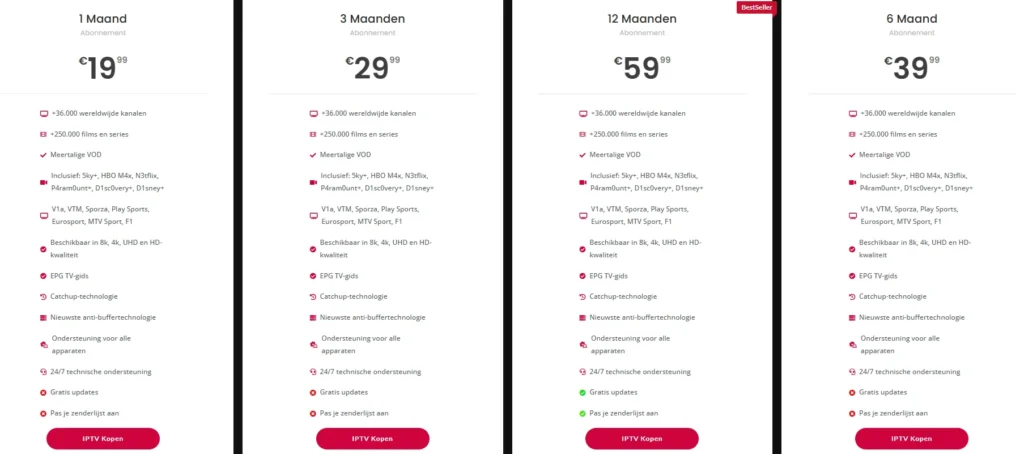
- Extensive Channel Lineup: Subscribing to a paid service like Smart IPTV Belgie grants access to over 36,000 global channels and 250,000 movies and series.
- Customer Support: Paid services often come with dedicated customer support, ensuring that users can resolve any issues quickly.
In summary, while free IPTV playlists may seem appealing, the benefits of subscribing to a paid service like Smart IPTV Belgie far outweigh the drawbacks. For more information on subscription options, visit our plans page.
Top IPTV Providers Serving Belgium
When searching for the best IPTV playlists, it’s crucial to consider reputable providers. Here are some of the top IPTV providers serving Belgium:
- Smart IPTV Belgie
- Offers a vast selection of channels and on-demand content.
- Supports multiple devices, including Smart TVs, smartphones, and PCs.
- Provides a user-friendly interface and 24/7 technical support.
- DutchIPTV4K
- Known for its competitive pricing and extensive channel offerings.
- Features a variety of international channels, catering to diverse audiences.
- ProIPTVSmarters
- Focuses on sports channels, making it a popular choice for sports enthusiasts.
- Offers flexible subscription plans to suit different viewing preferences.
- IPTVHUB24
- Provides a mix of local and international channels.
- Known for its high-quality streaming and reliable service.
Among these, Smart IPTV Belgie stands out due to its comprehensive offerings, including multilingual VOD and support for various streaming qualities, from HD to 8K. With a 7-day money-back guarantee, users can try the service risk-free.
For those interested in exploring the extensive channel lineup and features of Smart IPTV Belgie, check out our IPTV channel list for more details.
In conclusion, whether you choose free or paid IPTV playlists, understanding the differences and knowing the top providers can significantly enhance your viewing experience. For a reliable and high-quality IPTV service in Belgium, consider subscribing to Smart IPTV Belgie. If you have any questions or need assistance, feel free to contact us via WhatsApp for immediate support.
By leveraging the right IPTV playlists, you can unlock a world of entertainment tailored to your preferences.
How to Use an IPTV Playlist: Step-by-Step Setup
Using an IPTV playlist effectively can transform your viewing experience, allowing you to access a wide range of channels and on-demand content seamlessly. This section will guide you through the process of setting up your IPTV playlist, including recommended players and apps, as well as detailed installation instructions for various devices.
Recommended IPTV Players and Apps for Belgium Users
To get started with IPTV, selecting the right player is crucial. Here are some of the most popular IPTV apps that are highly recommended for users in Belgium:
- Kodi: A versatile media player that supports various formats, including M3U playlists. Kodi allows for extensive customization and has a large community for support.
- Perfect Player: Known for its user-friendly interface, Perfect Player is ideal for those who want a straightforward IPTV experience. It supports M3U playlists and offers EPG (Electronic Program Guide) features.
- TiviMate: A powerful IPTV player designed specifically for Android devices. TiviMate supports M3U playlists and provides a modern interface with advanced features like catch-up TV and multi-screen viewing.
When choosing an IPTV player, look for features such as:
- Compatibility with M3U playlists
- User-friendly interface
- Support for EPG
- Customization options
Installing Playlists on Devices
Once you have selected your IPTV player, the next step is to install your playlists. Here’s a step-by-step guide for installing IPTV playlists on various devices:
For Smart TVs
- Download the IPTV App: Go to your Smart TV’s app store and download your chosen IPTV player (e.g., Kodi, Perfect Player).
- Open the App: Launch the app after installation.
- Add Your Playlist:
- Navigate to the settings or playlist section.
- Select the option to add a new playlist.
- Enter the URL of your M3U playlist or upload the file if you have it saved on a USB drive.
- Save and Enjoy: Save your settings and start browsing through the channels.
For Smartphones (Android/iOS)
- Install the IPTV App: Download your preferred IPTV player from the Google Play Store or Apple App Store.
- Open the App: Launch the app on your device.
- Add Your Playlist:
- Go to the settings or playlist section.
- Choose to add a new playlist.
- Input the M3U playlist URL or upload the file.
- Start Watching: Save your changes and explore the available channels.
For PCs
- Download the IPTV Player: Install a compatible IPTV player like VLC or Kodi on your computer.
- Open the Player: Launch the application.
- Load Your Playlist:
- For VLC: Go to Media > Open Network Stream, then paste your M3U URL.
- For Kodi: Navigate to the settings, select PVR & Live TV, and add your M3U playlist.
- Enjoy Streaming: Once the playlist is loaded, you can start watching your favorite channels.
Tips for Managing and Updating Playlists Effectively
- Regular Updates: Ensure your M3U playlist is updated regularly to include new channels and remove any that are no longer available. Many IPTV services provide updated playlists periodically.
- Backup Your Playlists: Keep a backup of your M3U files in case you need to reinstall or switch devices.
- Use a VPN: For enhanced privacy and security while streaming, consider using a VPN. This can help protect your data and ensure a smoother streaming experience.
In conclusion, setting up and using an IPTV playlist is a straightforward process that can significantly enhance your viewing experience. By selecting the right player and following the installation steps, you can access a vast array of channels and on-demand content tailored to your preferences. For more information on IPTV services and playlists, visit Smart IPTV Belgie.
If you have any questions or need assistance, feel free to contact us via WhatsApp for immediate support. Enjoy your IPTV journey!
Legal Considerations for IPTV in Belgium
As the popularity of IPTV playlists continues to rise in Belgium, understanding the legal landscape surrounding their use is crucial for users. This section will explore the legality of IPTV services, the implications of streaming copyrighted content, and the importance of using VPNs for privacy and security.
Legality of IPTV and Streaming Copyrighted Content
In Belgium, the legality of IPTV services can be complex. While IPTV itself is a legitimate technology, the legality of the content being streamed depends on the source of the IPTV playlist. Here are some key points to consider:
- Legitimate IPTV Services: Services that have obtained the necessary licenses to distribute content are legal. For instance, Smart IPTV Belgie offers a subscription service that provides access to over 36,000 global channels and 250,000 movies and series, ensuring compliance with copyright laws.
- Illegal IPTV Services: Many free IPTV playlists may offer access to copyrighted content without proper licensing. Using these services can expose users to legal risks, including fines or other penalties. It is essential to verify the legitimacy of the IPTV provider before subscribing or using their playlists.
- User Responsibility: As a user, it is your responsibility to ensure that the IPTV service you choose complies with local laws. Always opt for reputable providers that clearly state their licensing agreements.
The Role of VPNs in IPTV Usage
Using a VPN (Virtual Private Network) is highly recommended for IPTV users in Belgium for several reasons:
- Privacy Protection: A VPN encrypts your internet connection, making it difficult for third parties to monitor your online activities. This is particularly important when using IPTV services, as it helps protect your personal information from potential breaches.
- Bypassing Geo-Restrictions: Some IPTV services may be restricted to specific regions. A VPN allows you to change your IP address, enabling access to content that may not be available in Belgium.
- Enhanced Security: VPNs provide an additional layer of security, protecting your data from hackers and other malicious entities, especially when using public Wi-Fi networks.
When selecting a VPN for IPTV usage, consider the following features:
- High-Speed Connections: Look for a VPN that offers fast speeds to ensure smooth streaming without buffering.
- No-Log Policy: Choose a VPN that does not keep logs of your online activities, ensuring your privacy is maintained.
- Compatibility: Ensure the VPN is compatible with your devices and the IPTV player you are using.
Some reputable VPN services to consider include:
| VPN Service | Key Features | Price Range |
|---|---|---|
| ExpressVPN | High-speed, no-log policy | €6.67/month |
| NordVPN | Strong security features, user-friendly | €3.71/month |
| CyberGhost | Dedicated servers for streaming | €2.75/month |
In conclusion, understanding the legal considerations surrounding IPTV playlists in Belgium is essential for a safe and enjoyable viewing experience. Always opt for legitimate services like Smart IPTV Belgie to avoid legal issues and enhance your streaming quality. Additionally, using a VPN can significantly improve your privacy and security while accessing IPTV content.
For more information on IPTV services and to explore subscription options, visit Smart IPTV Belgie. If you have any questions or need assistance, feel free to contact us via WhatsApp for immediate support. Enjoy your IPTV experience while staying informed and secure!
Troubleshooting Common IPTV Issues
While using an IPTV playlist can provide a seamless viewing experience, users may occasionally encounter issues that disrupt their enjoyment. This section will address common IPTV problems, including stream buffering and lag, playlist errors, and device compatibility tips. By understanding these issues and their solutions, you can enhance your IPTV experience and ensure smooth streaming.
Stream Buffering and Lag Solutions
Buffering and lag are two of the most frustrating issues IPTV users face. These problems can stem from various factors, including internet speed, server issues, or device performance. Here are some common causes and practical solutions to enhance your streaming quality:
Common Causes of Buffering and Lag
- Slow Internet Connection: A slow or unstable internet connection is often the primary cause of buffering. For optimal IPTV performance, a minimum speed of 10 Mbps is recommended for HD streaming, while 25 Mbps is ideal for 4K content.
- Network Congestion: If multiple devices are using the same network, it can lead to congestion and slow down your connection. This is especially common during peak usage times.
- Server Issues: Sometimes, the IPTV provider’s server may experience high traffic or technical difficulties, leading to lag or buffering.
Practical Solutions
- Check Your Internet Speed: Use an online speed test tool to check your connection speed. If it’s below the recommended threshold, consider upgrading your internet plan or contacting your ISP.
- Reduce Network Load: Disconnect other devices from your network while streaming to minimize congestion. This can significantly improve your streaming experience.
- Use Wired Connections: If possible, connect your device directly to the router using an Ethernet cable. Wired connections are generally more stable than Wi-Fi.
- Adjust Streaming Quality: If buffering persists, consider lowering the streaming quality in your IPTV app settings. This can help reduce the load on your internet connection.
- Restart Your Router: Sometimes, simply restarting your router can resolve connectivity issues and improve streaming performance.
Playlist Errors and Fixes
Another common issue IPTV users may encounter is playlist errors. These can manifest as missing channels, playback failures, or error messages when trying to access content. Here are some common playlist errors and how to fix them:
Common Playlist Errors
- Missing Channels: This can occur if the channel URLs in your M3U playlist are outdated or no longer active.
- Playback Failures: If a channel fails to load, it may be due to server issues or incorrect playlist formatting.
- Error Messages: Messages like “Channel not found” or “Stream unavailable” can indicate problems with the playlist or the IPTV service.
Tips for Ensuring Device Compatibility
- Regularly Update Your Playlist: Ensure that your M3U playlist is updated frequently to include new channels and remove those that are no longer available. Many IPTV services provide updated playlists periodically.
- Check Playlist Format: Make sure your playlist is in the correct format (M3U) and that the URLs are properly formatted. You can use a text editor to review and edit your playlist.
- Test on Multiple Devices: If you encounter playback issues, try accessing the playlist on different devices to determine if the problem is device-specific.
- Contact Support: If you continue to experience issues, reach out to your IPTV provider’s customer support for assistance. They can help troubleshoot specific problems related to their service.
Frequently Asked Questions about IPTV in Belgium
As the popularity of IPTV playlists continues to grow in Belgium, many users have questions regarding their usage, legality, and troubleshooting. This section aims to address some of the most common queries from users, providing clear and concise answers to help you navigate the world of IPTV effectively.
Common Queries from Users
- What is an IPTV playlist and how do I use it?
An IPTV playlist is a file that contains a list of streaming URLs for various television channels. Users can load these playlists into compatible IPTV players to access live and on-demand content. To use an IPTV playlist, simply download the M3U file or copy the URL, then add it to your chosen IPTV player, such as Kodi or Perfect Player. - Are IPTV playlists legal in Belgium?
The legality of IPTV playlists in Belgium depends on the source of the content. Legitimate IPTV services that have obtained the necessary licenses to distribute content are legal. However, many free IPTV playlists may offer access to copyrighted content without proper licensing, which can expose users to legal risks. Always opt for reputable providers like Smart IPTV Belgie to ensure compliance with local laws. - Which IPTV apps work best for Belgium users?
Some of the best IPTV apps for users in Belgium include:
- Kodi: Highly customizable and supports various formats, including M3U.
- Perfect Player: User-friendly interface with EPG support.
- TiviMate: Designed for Android devices, offering advanced features for IPTV users.
- How do I find free Belgian IPTV playlists?
While there are many sources for free IPTV playlists, it’s essential to be cautious. Look for reputable forums or websites that share playlists, but always verify their legality. For a reliable option, consider subscribing to a paid service like Smart IPTV Belgie, which offers a vast selection of channels and on-demand content. - How to avoid IPTV scams or illegal streams?
To avoid scams, always research the IPTV provider before subscribing. Look for user reviews, check their website for licensing information, and ensure they offer customer support. Legitimate services like Smart IPTV Belgie provide transparency about their offerings and legal compliance. - Can I watch Belgian TV channels on IPTV?
Yes, many IPTV services offer access to Belgian TV channels. By using a service like Smart IPTV Belgie, you can enjoy a wide range of local channels along with international content. - How to add or update an IPTV playlist on my player?
To add or update an IPTV playlist, open your IPTV player, navigate to the settings or playlist section, and enter the URL of your M3U playlist or upload the file. Regularly check for updates from your IPTV provider to ensure you have the latest channels. - Is a VPN necessary when using IPTV in Belgium?
While not mandatory, using a VPN is highly recommended for IPTV users. A VPN enhances your privacy by encrypting your internet connection, protects your data from potential breaches, and allows you to bypass geo-restrictions on content.
How to Avoid IPTV Scams or Illegal Streams
To ensure a safe and enjoyable IPTV experience, follow these best practices:
- Research Providers: Before subscribing, research the IPTV provider thoroughly. Look for reviews and feedback from other users to gauge their reliability.
- Check Licensing: Ensure that the IPTV service has the necessary licenses to distribute content legally. Legitimate providers will often display this information on their website.
- Use Trusted Sources: Stick to well-known IPTV services like Smart IPTV Belgie that offer transparency and customer support.
- Be Wary of Free Services: While free IPTV playlists may seem appealing, they often come with risks, including poor quality and potential legal issues. Consider investing in a paid service for a better experience.
By following these guidelines, you can enjoy a seamless IPTV experience while minimizing the risks associated with illegal streams and scams.
Conclusion: Unlock the Power of Playlist IPTV in Belgium
In conclusion, embracing playlist IPTV opens up a world of entertainment possibilities for viewers in Belgium. With the right IPTV playlists, you can enjoy a vast selection of channels, including local Belgian favorites and international content, all at your fingertips. Here are some key benefits to remember:
- 24/7 Support: With services like Smart IPTV Belgie, you have access to round-the-clock technical support, ensuring that any issues you encounter can be resolved quickly and efficiently.
- Comprehensive Setup Guides: Our detailed setup guides make it easy for you to get started with your IPTV playlists, regardless of the device you’re using.
- Up-to-Date Content: Enjoy the latest shows, movies, and live sports with playlists that are regularly updated to include new channels and content.
By choosing a reputable provider like Smart IPTV Belgie, you can rest assured that you are accessing high-quality streams legally and safely. Whether you’re looking for free or paid options, understanding the differences and knowing where to find the best playlists is crucial for an enjoyable viewing experience.
Ready to dive into the world of IPTV? Don’t hesitate to explore our subscription options and discover the perfect plan for your needs. If you have any questions or need assistance, feel free to reach out to us via WhatsApp for immediate support.
Start your IPTV journey today and unlock endless entertainment possibilities!
